A college website you’re proud to share. A team to keep it running.
Custom design, an easy-to-use CMS, and fully managed AWS hosting. Help prospective students explore their options and give campus staff a clearer way to keep information current.
Example Community CollegeAcademics AdmissionsApply
Your next chapter starts here.
Real opportunities. A brighter tomorrow.
Explore our programs →
Example Community College
Your next chapter starts here.
Real opportunities. A brighter tomorrow.
Explore our programs →
Illustrative website concept.
A Revion Solutions companyRevion: established in 199924/7/365 support
Solutions & Pricing
We're an Open Book.
Larger schools require more resources for hosting and support, so our pricing is based on your school's FTE (Full-Time Equivalent) student count. Simple.
Launch a program. Fill an open house. Share your next big story. Put your team in control and keep moving.
A fresh headlineFind your future.
A campus momentOpen House
A new opportunityExplore nursing.
Make it live.
Your next chapterFind your future.Explore ↗
Open House↗
Explore nursing.↗
Ready for your students.
Illustrative concept: a headline, a campus event, and a new opportunity come together on a website across desktop and mobile screens. This is not a customer site or a measure of publishing speed.
You bring the next big thing. We keep it running. Managed hosting. Ongoing maintenance. A team behind yours.
A website built for campus life
Help students find their next step. Give editors a clearer way to publish.
Your website serves people choosing a program and the staff keeping information current. College Inbound combines custom design and implementation with a CMS built around everyday college content.
Design around student needs
Organize program information, campus news and important next steps in a custom design that reflects your college’s brand and audiences.
Build with reusable patterns
Visual editing and reusable templates help campus staff create pages consistently. Elementor Pro and the included campus tools support the design; our team implements the site.
Manage more than pages
Use the documented CMS tools for events, staff directories, alerts, courses and degree maps, alongside Gravity Forms, Smart Slider and Icegram.
Put the useful details where people can find them.
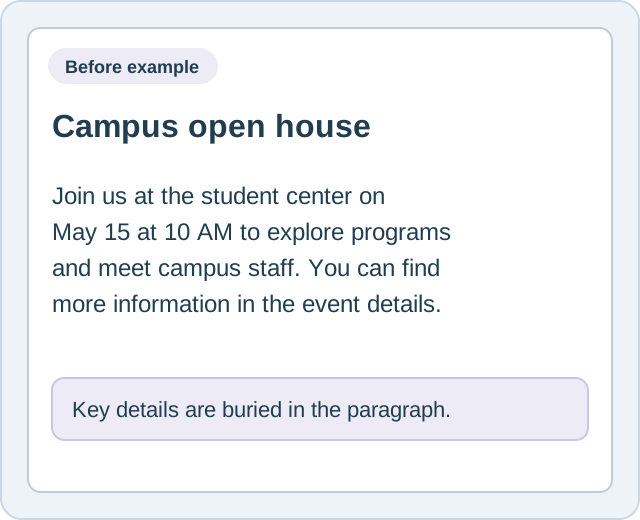
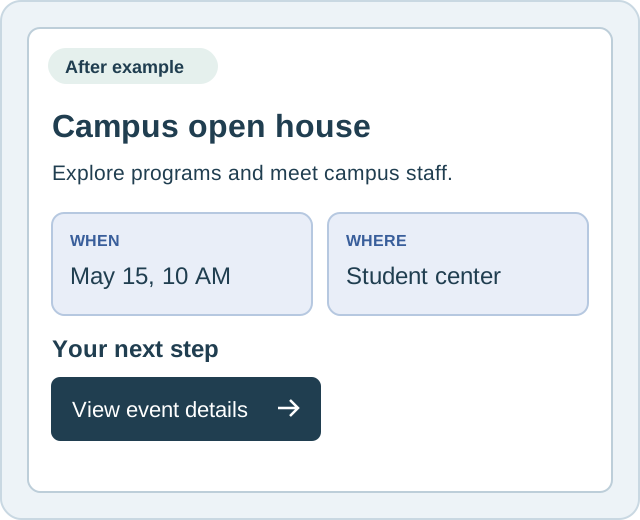
An event update needs more than a title. A consistent layout gives the date, location and next step a clear place on the page.
Your staff supply and approve the information. Visual editing and reusable layouts help them present it consistently without rebuilding each page from scratch.
Before
A paragraph mixes the date, place and invitation together. Readers have to search the copy for the details.
After
A structured event layout separates the date, location and next step so the information is easier to scan.
Visual editing
Reusable layouts
Campus content
Fictional content layout example. This is an illustration, not a recording of the editor.
From your current site to launch
A clear plan for the move.
Content transfer covers pages, images, documents and navigation. We guide the transition; your college provides access, confirms what should move and approves the site before it goes live.
01
Discover
Review your current site, brand and audiences. Confirm the content inventory, access, priorities and responsibilities for the project.
02
Design and build
Create the custom design and implement the page templates and CMS. Your team reviews the direction and provides feedback.
03
Transfer and review
Move the content to the platform and review it in staging. Check pages, navigation and accessibility issues before launch; your team confirms content accuracy.
04
Launch and support
Coordinate the launch with your college and the people managing domain access. After launch, managed hosting and support keep the platform maintained.
What the engagement brings together
A working website and the platform behind it.
Design and content transfer are one-time project fees. The ongoing plan provides CMS licensing, managed hosting and support, with custom development hours determined by your tier.
Custom website design aligned with your college’s brand standards.
Responsive page templates and a visual content management system.
Transfer of existing pages, images, documents and navigation.
A staging environment for review and testing before launch.
Managed AWS hosting, maintenance and 24/7/365 support.
The annual custom development hours listed in your selected plan.
We confirm project-specific requirements, integrations and any additional work during scoping. The pricing cards list the existing plan features and fees.
Know who handles what after launch.
Managed hosting takes the platform work off your campus team’s list. Content ownership and publishing decisions stay with your college.
We maintain the platform
AWS hosting, platform updates, security patching, uptime monitoring and technical support. Plans include nightly backups with seven-day retention, SSL, a CDN, DDoS protection and a managed WAF.
Your team owns the content
Keep program details, deadlines, contacts and documents accurate. Review and approve changes, and maintain accessibility when publishing new content and media.
We scope further changes
Use your plan’s custom development hours for agreed design, widget, layout or integration work. Discuss requirements and available hours before starting additional work.
A separate web governance subscription. GuardGrid is not included in hosting fees. It provides ongoing web governance monitoring; College Inbound handles the design, implementation and managed hosting services described here.
Do we have to migrate our existing content ourselves?
No. Content transfer is part of the engagement and carries the one-time fee shown in the plans. We move existing pages, images, documents and navigation. Your college confirms the content inventory, provides access and reviews the transferred information for accuracy.
Who maintains the site after launch?
College Inbound handles AWS hosting, security patching, backups, uptime monitoring, platform updates and 24/7/365 technical support. Your staff own content updates and approvals. Additional design or development work is scoped against your plan’s available hours or a separate agreement.
What CMS and campus tools are included?
The College Inbound CMS uses WordPress, Elementor Pro and the documented plugins and campus tools. These include Gravity Forms, Smart Slider, Icegram, events, staff directories, alerts, courses and degree maps. Our Features page describes the capabilities. GuardGrid is a separate subscription.
Can non-technical staff update the website?
Yes. Visual drag-and-drop editing and reusable templates help editors update pages without writing code. Campus tools support structured content such as program pages, events and directories. Your team supplies the information and makes publishing decisions.
How do we review the site before launch?
A staging environment gives your team a place to review the design, transferred content and navigation. We coordinate the review and launch responsibilities with your college, including approvals and the necessary website and domain access.
What do the project fees and ongoing plan cover?
The one-time design and content transfer fees cover the custom design and migration work described on this page. The ongoing plan covers CMS licensing, managed hosting, maintenance and support, plus the annual custom development hours listed for your tier. Exact prices, fees and billing terms are shown in the pricing cards.
What accessibility work remains after launch?
Accessible templates provide a starting point, and we review for accessibility issues before launch. Your college must maintain accessibility as new content, documents and media are added. No platform guarantees ongoing compliance. Additional remediation can be scoped separately, and GuardGrid monitoring is a separate subscription.
Can you help with integrations or later changes?
Tell us which systems and changes you need. Annual custom development hours can be used for agreed page designs, widgets, integrations and layout work. We confirm requirements, technical fit and the scope before committing to additional work.
Let’s talk about your college’s next website.
See the CMS, discuss your current site, and find the right plan for your team.
We use cookies to run this site, remember your preferences, and understand how visitors use
College Inbound. You can accept all, reject non-essential cookies, or choose which categories
to allow. See our Privacy Policy.
Customize Consent Preferences
We use cookies to help you navigate efficiently and perform certain functions. You can
change your choice at any time using the Cookie settings link in the footer.
Essential
Always Active
Required for the site to work: security, network management, the live chat, the anti-spam
check on the free scan form, and remembering this consent choice. These cannot be
switched off.
NameDurationPurpose
ci_consent180 daysStores your cookie choice so we do not ask again. (collegeinbound.com)
revion-livechat:sessionUntil you clear itLocal storage key that keeps one chat conversation together across pages. (Revion live chat)
cf_challengeSessionCloudflare Turnstile anti-spam check on the free scan form. Set only on that page. (Cloudflare)
Analytics
Helps us understand how visitors use the site, in aggregate, so we can improve it. Nothing
is requested from Google until you turn this on.
NameDurationPurpose
_ga2 yearsTells one visitor from another so visits can be counted without identifying you. (Google Analytics)
_ga_NGR2YZX29H2 yearsKeeps track of the current session for this site's Google Analytics property.
Marketing
Used to measure how our advertising performs and to reach people who have visited before.
Nothing is requested from Meta until you turn this on.
NameDurationPurpose
_fbp3 monthsIdentifies a browser so Meta can measure ad performance. (Meta pixel)
lastExternalReferrerUntil you clear itLocal storage keys recording the site you arrived from. (Meta pixel)